Everythingwants yourattention.Protect your dayfor what matters most.

CalmView adds a calm layer to Gmail, so you can organize your life around what matters and know exactly what to do today.

See how it works

Chrome extension for Gmail

A person calmly plans at a laptop while work, family, health, bills, appointments, friendships, subscriptions, and future plans compete for attention around him

Gmail is built for email.CalmView is built for your whole life.

Without CalmView

An endless stream of emails

Inbox1,284 unread
SarahProject update
XeroInvoice due Friday
Smile DentalAppointment reminder
AdobeYour subscription renews Friday
AlexCan you review the latest draft?
Air New ZealandBooking confirmation
The TanneryJuly campaign assets
Google CalendarInvitation: Team check-in
  • No bigger picture
  • No priorities
  • Everything looks equal
  • No plan for today
  • Important work gets buried

With CalmView

One clear view of your life

MGmailcalmview on
Current priorityLaunch the new website
Current priorityOpen the new location
TodayA clear plan
EmailReply to Sarah
TaskFinish project brief
HabitTrain for 30 minutes
SubscriptionAdobe renews Friday
  • Current priorities
  • Emails + tasks
  • Habits + routines
  • Bills + subscriptions
  • A clear plan for today

The problem, personified

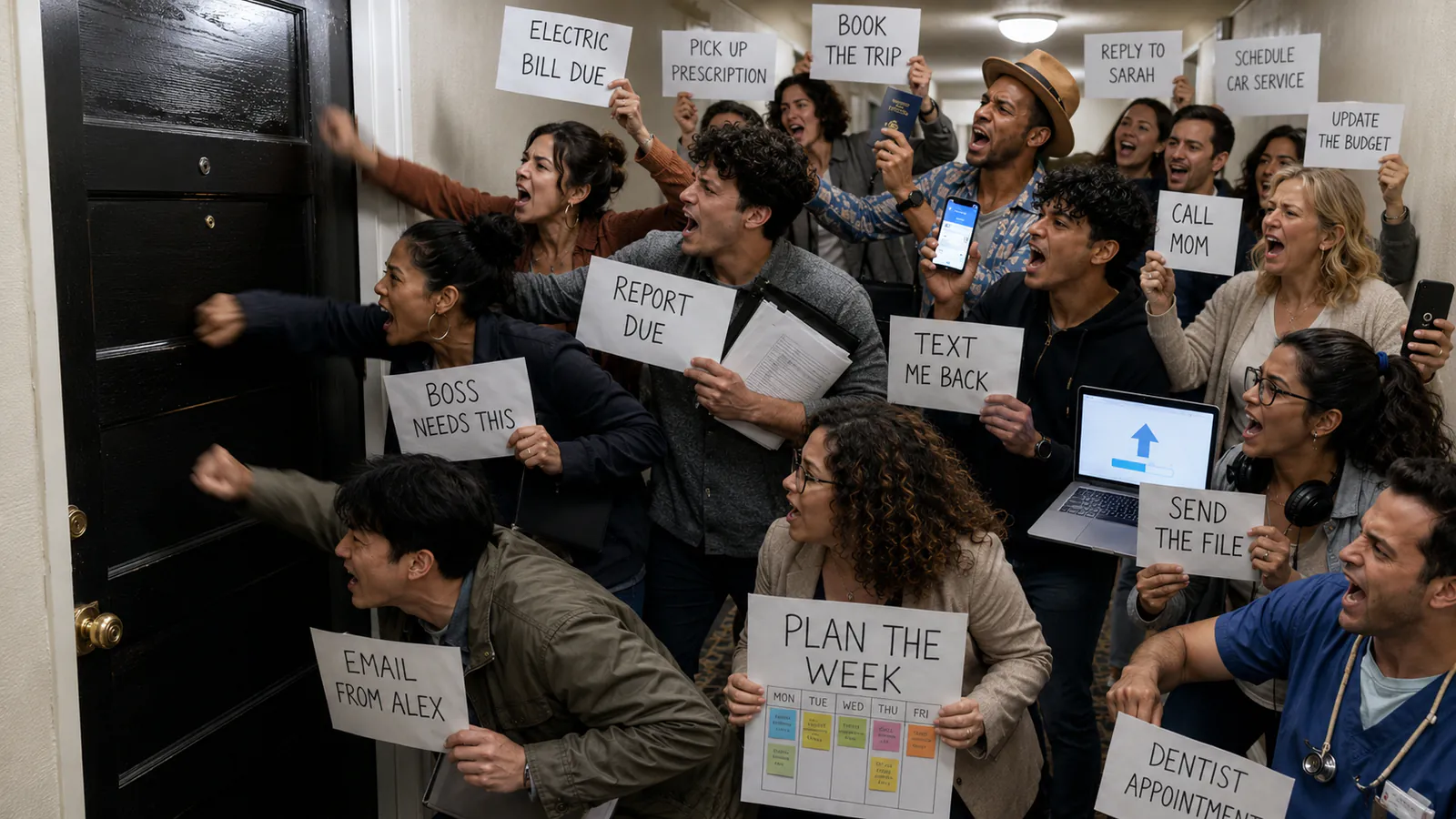
Every morning, everything wants in.

Emails, deadlines, habits, favours, and loose ends all arrive at once. They all knock loudly. Without a clear direction, the loudest thing gets mistaken for the most important.

Personified emails, bills, appointments, and projects hammering on one apartment door
Everything wants your attentionThe loudest thing is not always the right thing
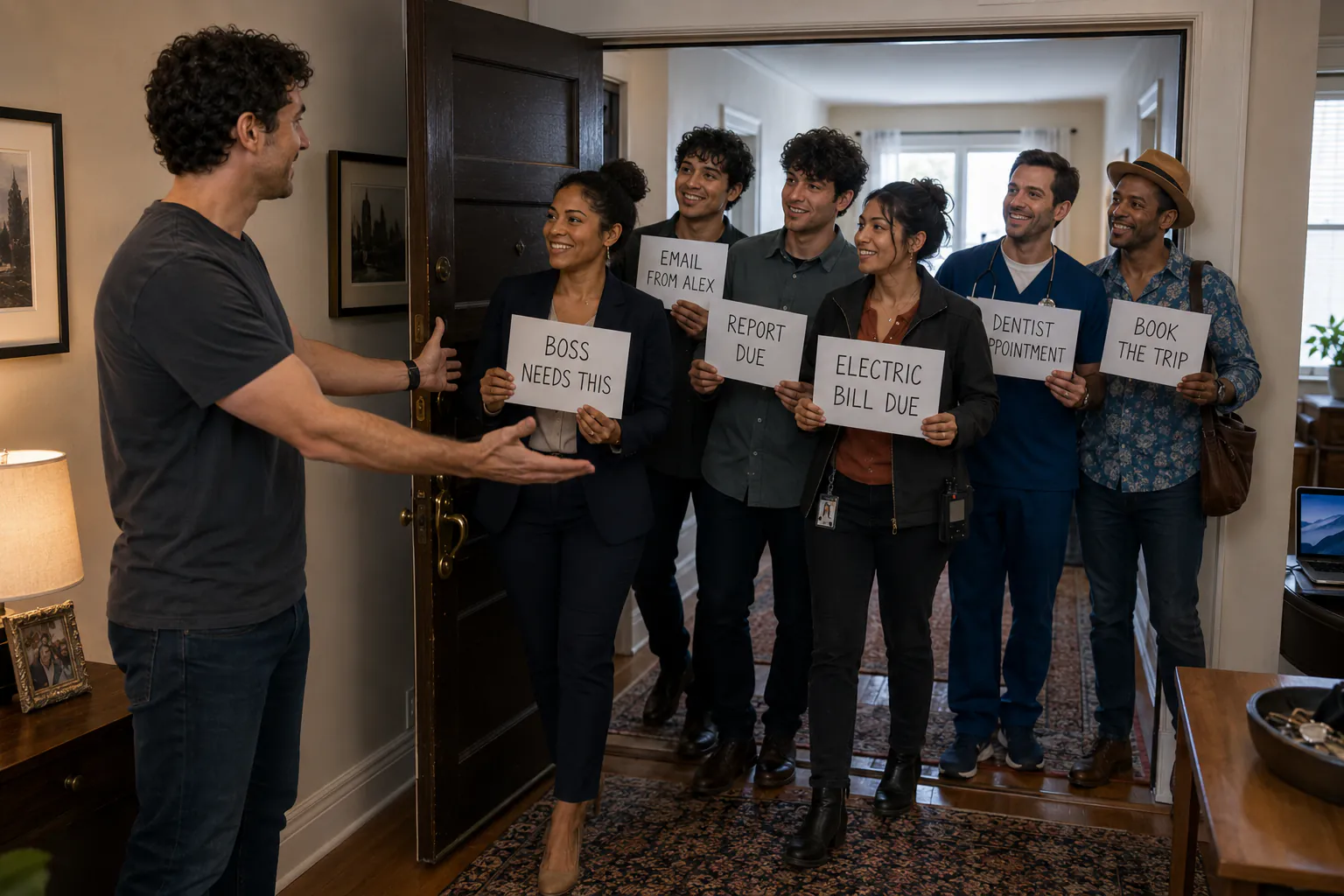
Six personified tasks being invited through the door for today: the boss, an email from Alex, a report, an electric bill, a dentist appointment, and a trip

“You six can come in.”

Not: What is shouting loudest?Instead: What deserves part of the life and day I am building?

Let your direction decide

Now you know who belongs today.

Let in the work that moves your current priorities or keeps an important responsibility handled. Give everything else a date, so it leaves your attention until it is genuinely relevant.

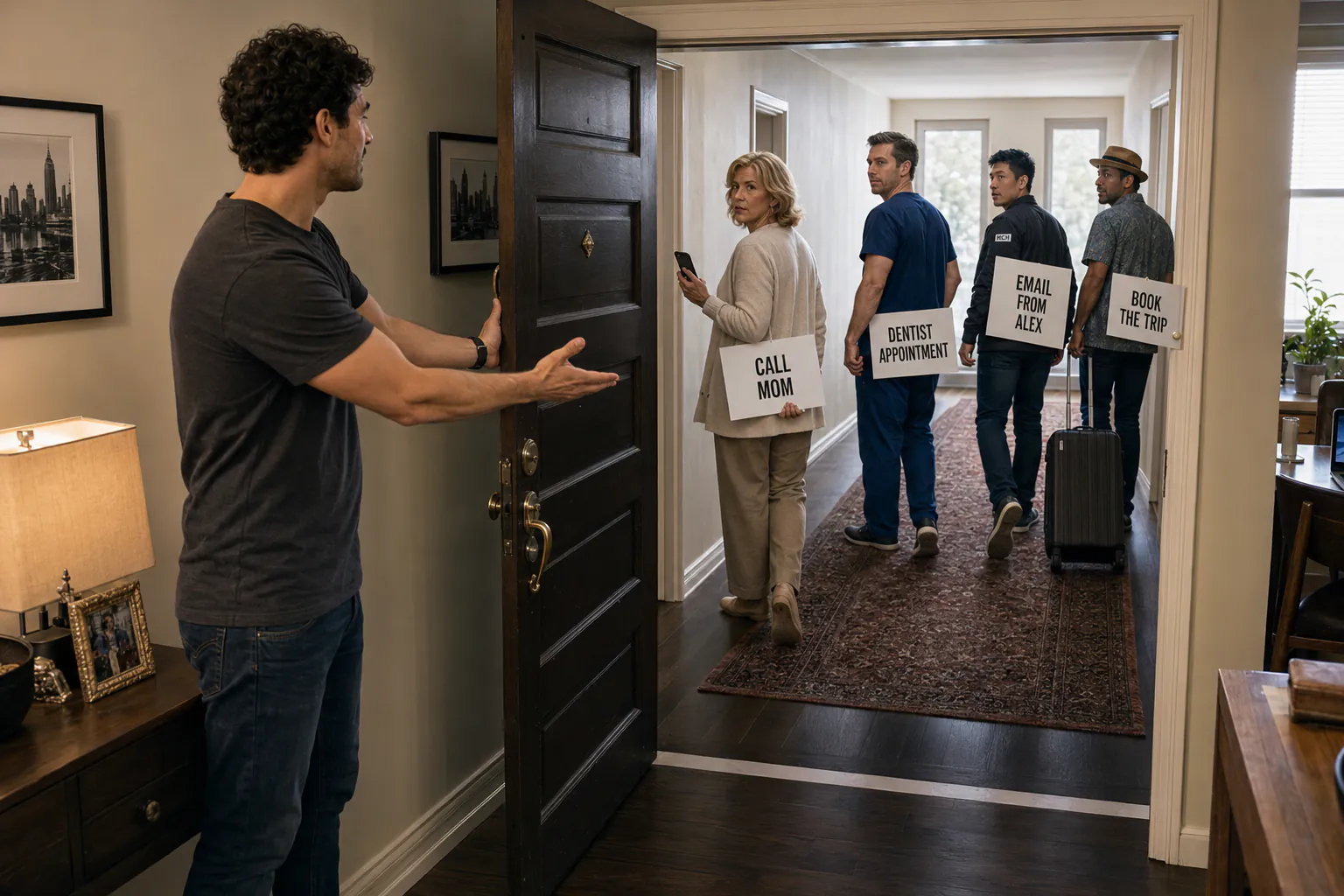
The final visitors walking away while still holding their original task signs
Call MomTomorrowDentistThursdayAlexNext weekBook the tripFriday

Give everything else a place

Tomorrow. Thursday. Next week.

Scheduling is not avoidance. Once the right things have entered today, everything else receives a place and disappears until it is actually relevant.

But

Choosing the right thing is only half the battle.

Even priority-aligned work becomes overwhelming when it all talks at once.

Six personified tasks crowding around a man trying to work at his laptop

Here is the solution

Give every task a place, then open one room at a time.

Urgent protects your responsibilities. Main Progress gets your best attention. Admin waits until the meaningful work has moved forward.

The same six personified tasks sorted into natural rooms labelled Urgent, Main Progress, and Admin

01

Urgent

Handle what genuinely cannot wait.

02

Main Progress

Protect the work that advances your current priorities and goals.

03

Admin

Contain replies, bookings, forms, and upkeep until meaningful work has had its place.

Every morning

See what matters.
Then plan today.

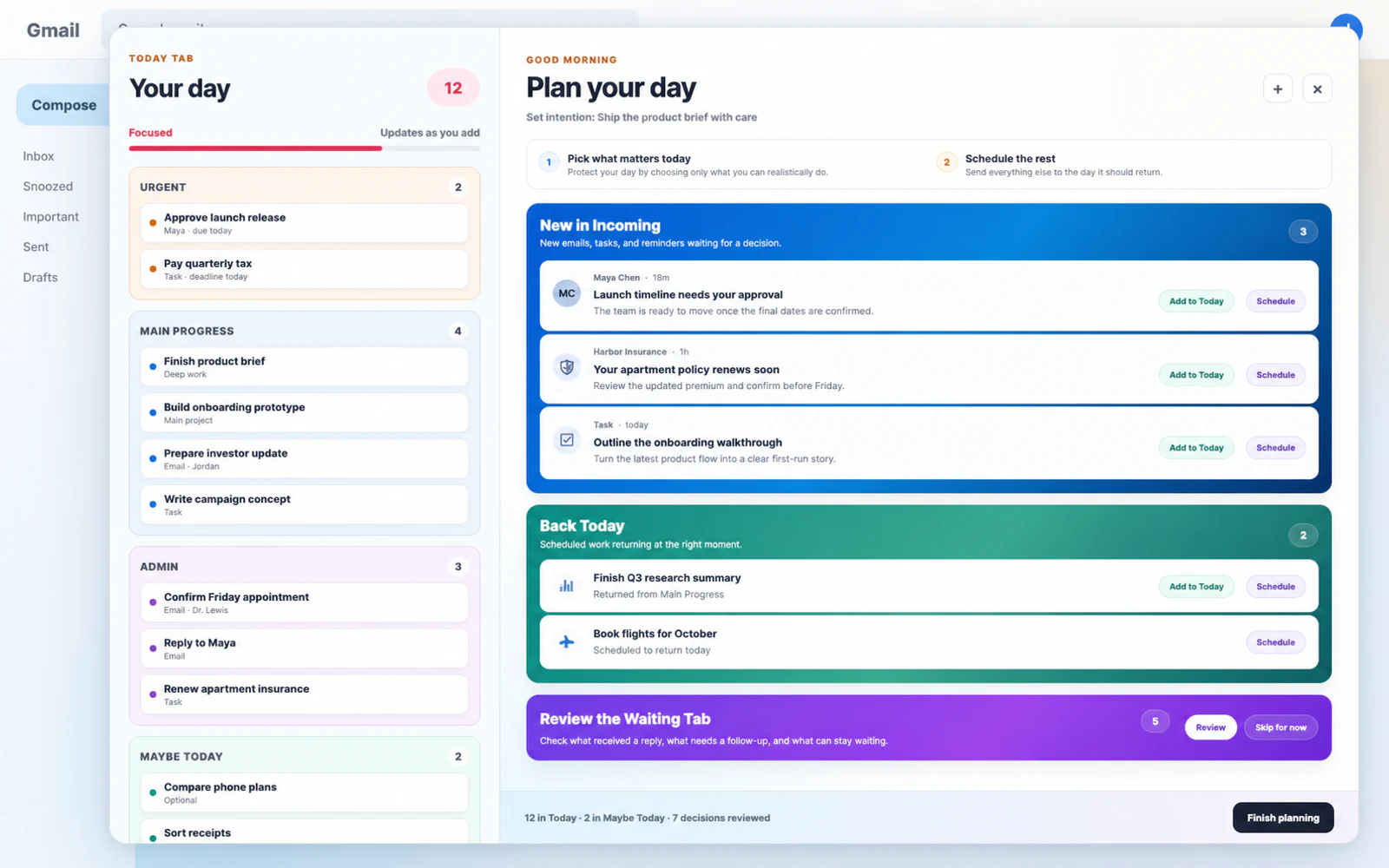
Before you process a single incoming item, CalmView shows your current priorities, goals, and ongoing responsibilities. Then you decide what belongs today and schedule the rest.

Your Current PrioritiesStart with what matters
Edit direction
Build Clear The DayCurrent goal Ship the redesigned Plan Your Day experience
Protect my healthCurrent goal Rebuild consistent training and recovery
Develop my social lifeCurrent goal Meet people and build meaningful connection
Stay on Top OfCinemasInvestmentsMoney & TaxPocket PartyHome
CalmView's two-column Plan your day workspace, with a populated Today column beside Incoming, returning, and Waiting reviews
Remember what matters
See your direction before the task pile takes over.
Choose what deserves today
Review each incoming demand through that lens.
Schedule the rest
Give everything else the date it deserves.
Build a day you can finish
Keep the final plan both meaningful and realistic.

What all the organizing was for

Clear the day.Make room for life.

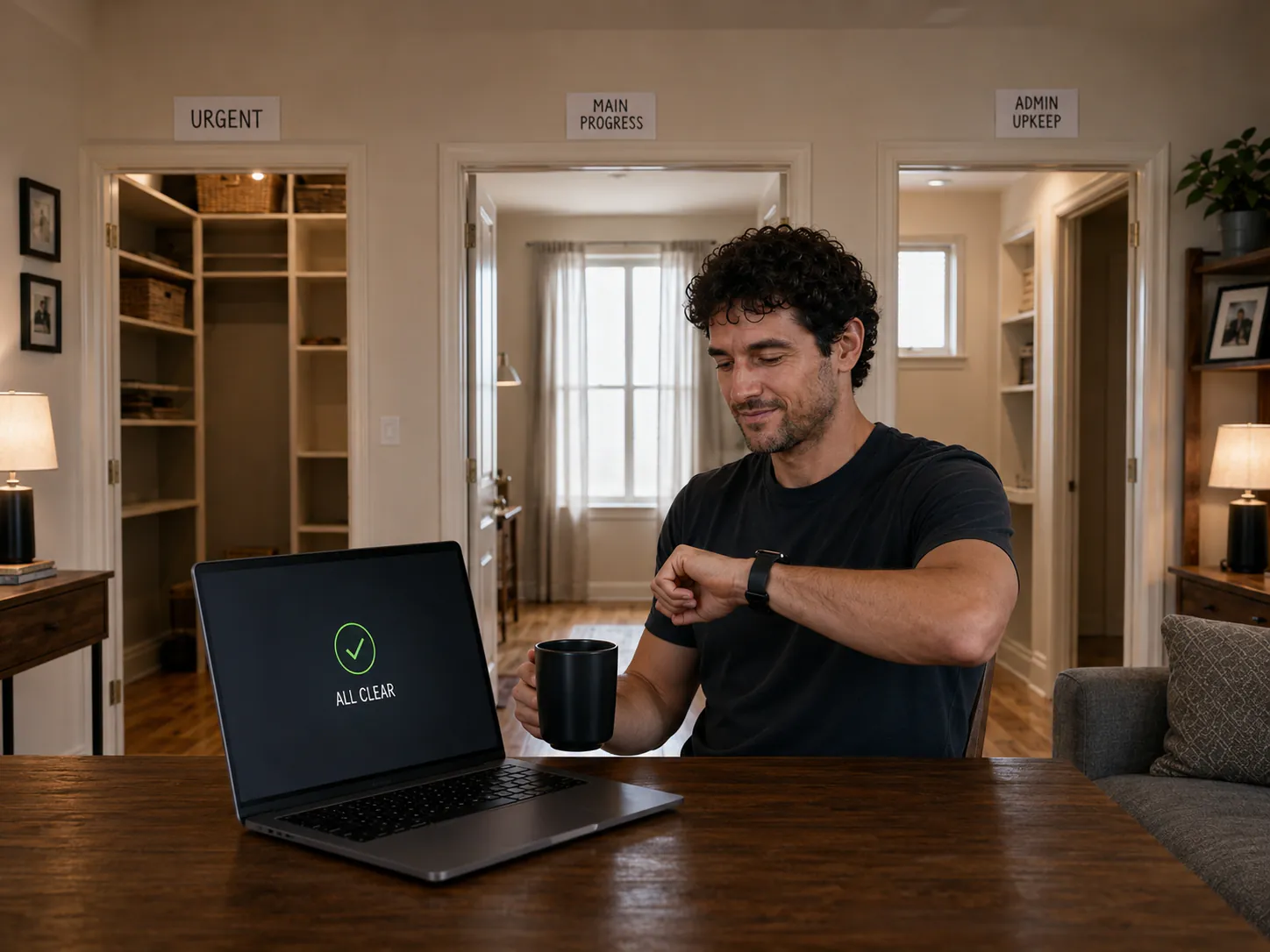
The reward is not an empty dashboard. It is the moment you know you are done, look up from the laptop, and let the life you care about in.

A relaxed man checks his watch beside an all-clear laptop after the three task rooms are emptied
The work is handled. The rest of the day belongs to you.
Friends at the same door holding signs for swimming, coffee, reading, cooking, and rest
And now, the life you care about comes knocking.
The man leaves his apartment with the swimming and coffee friends he chose
This is what clearing the day was for.

Direction, not just completion

Most productivity apps help you finish your tasks.CalmView helps you make sure they are the right tasks.

Priorities without action remain aspirations. Tasks without priorities become noise. CalmView keeps direction and execution together, inside the place where so much work already arrives.

Designed to feel calmer

Direction stays visible. The day stays calm.

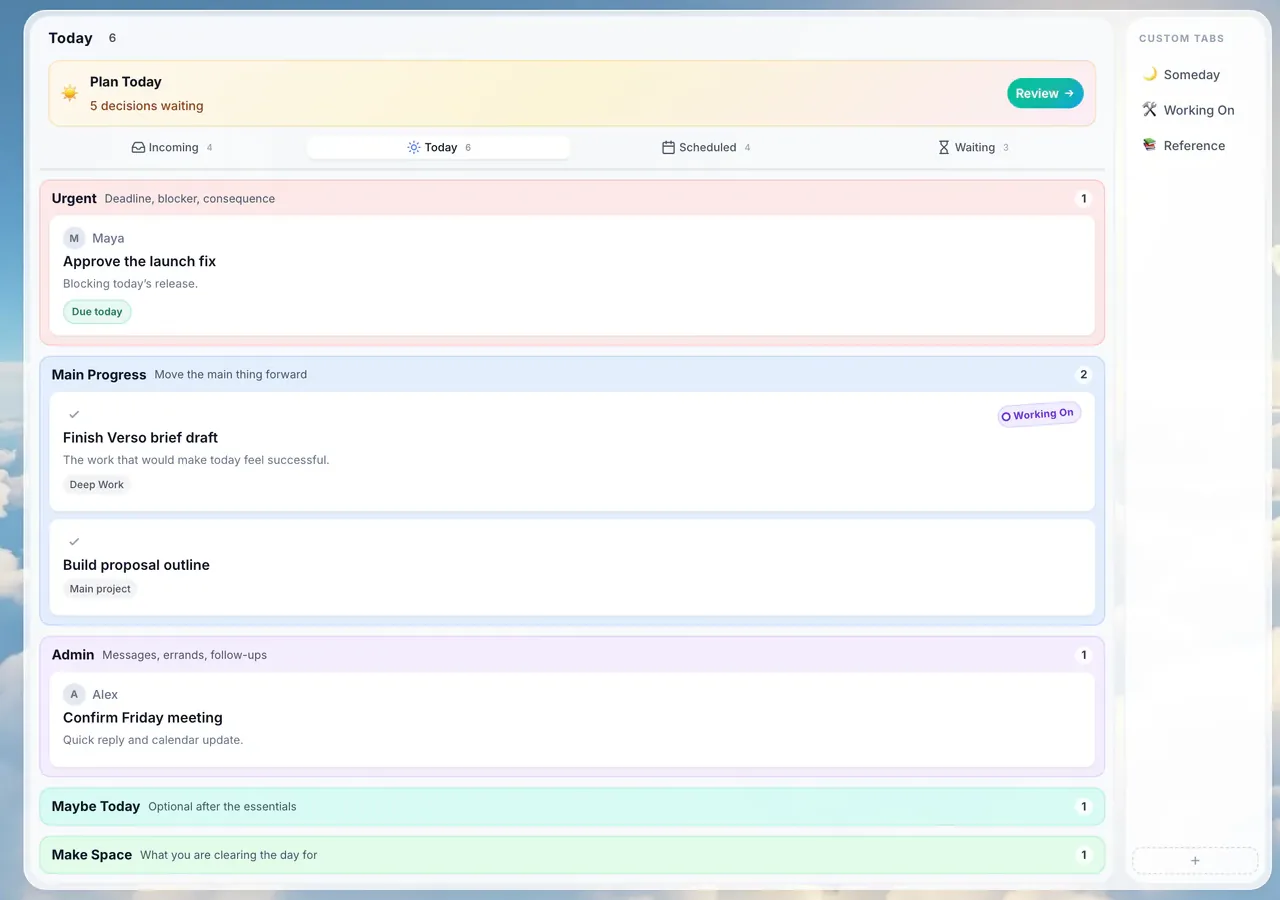
CalmView keeps direction above the daily workflow, then separates what cannot wait, what moves life forward, and what can come later. Make Space remains there quietly, supporting life beyond the list.

The real CalmView Today workspace inside Gmail, organized into Urgent, Main Progress, Admin, Maybe Today, and Make Space
Current Priorities stay visible
Remember where you are going before urgency chooses for you.
Current Goals define progress
Each priority has one clear result you are currently trying to move forward.
Stay on Top Of remains quiet
Keep ongoing responsibilities visible without turning them into another loud dashboard.
Urgent stays contained
Handle genuine pressure without allowing it to colour the whole day.
Main Progress protected
Give direction-aligned work your best attention before admin takes over.
Admin waits its turn
Keep replies, errands, upkeep, and loose ends together.

How the calm layer works

Get on top of your life,right inside Gmail

1 Incoming

Everything lands here

From SarahProject update
TaskReview Q2 budget
ReminderDentist Thursday
HabitMorning walk

2 Today

Choose what belongs today

Today Add

Urgent

Respond to Sarah

Main Progress

Prepare investor update

Admin

Team check-in

3 The Rest

Give everything else a place

Scheduled

Dentist Thursday9:00 AM
Review Q2 budgetFriday

Waiting

Partnership ideaAlex
Car serviceNext week

4 Make Space

For what really matters in your life

Three friends laughing together at an outdoor café in warm late-afternoon light
Work handled. Life waiting.

CalmView is more than an inbox

Not just your inbox.
Your whole life.

Keep direction, daily decisions, and ongoing responsibilities in one calm system inside Gmail. The things that matter stay visible, even when they are not the things shouting loudest.

Current Priorities

Set up to three current priorities for this chapter of your life. They remain visible before and during daily planning.

Current Goals

Define one clear result beneath each priority, so “what matters” becomes more concrete.

Stay on Top Of

Keep businesses, finances, home, relationships, and other ongoing responsibilities safely in view without making them all top priorities.

Plan today

Review every new or returning item through the context of what matters, then choose Today or schedule it.

Tasks

Create and manage tasks right alongside your emails — so the things you need to do live in the same place as the things that create them.

People

Stay close to the people who matter. CalmView tracks how warm each relationship is and nudges you before anyone quietly drifts.

Habits

A built-in habit tracker for the routines you want to keep — visible every day, so consistency actually sticks.

Recurring

Create tasks and reminders that come back on the schedule you choose — daily, weekly, or whenever it matters.

Smart cards

AI-powered cards that run on a schedule or trigger on events — daily digests, useful reminders, and custom alerts surfaced when you need them.

To-do list

Keep quick errands and out-and-about jobs together, without letting them crowd the work that needs real focus.

Subscriptions

Track recurring payments and renewal dates before they turn into expensive surprises.

Reminders

Bring important things back on the date you choose, exactly when they become relevant again.

Everything that matters, in one calm place.

Designed to help

Staying organized should feel easier.

CalmView uses AI, tags, status, and calming design to help you sort things faster, see what belongs in Today, and keep life organized without so much mental effort.

AI where it helps
Clarifies your own words and turns messy threads into clear tasks. You decide what matters.
Tags & status
Add context, then keep the next action’s state visible.
Quick edit
Importance tier, checklist, and note — all in one panel.
Calming by design
Soft colours and space, built so your mind can breathe.

Mobile companion

Included free

Take it with you.
Capture it quickly.

CalmView includes a free mobile companion for quick capture on the go — voice notes, fast task entry, easy checklists, and instant access to what you need while you're out.

Voice captureRamble naturally. CalmView turns it into useful tasks.
Quick captureThoughts, reminders, ideas - captured in seconds.
Out & about listErrands, shopping, and things you need while you’re out.

Make room for what matters.
Give the rest a place.

Keep priorities, tasks, habits, reminders, and everything else in one calm layer inside Gmail—so you know what deserves today and what can wait.

Free to start · No credit card · Gmail required